QUICK ANSWER
A successful OneStream XF implementation follows 7 structured phases — from business case alignment through post-go-live optimization — and typically spans 6–18 months. The organizations that succeed treat it as a business transformation project, not a software installation.
TriState Technology has guided 50+ finance teams through this process. This guide covers every phase, the decisions that trip teams up, and a free implementation checklist.
Most OneStream XF implementations go sideways before a single module is configured.
Not because the software is difficult. Not because the team is incompetent. But because the preparation work that happens in the weeks before configuration starts does not get the attention it needs.
We have helped more than 50 organizations implement OneStream across industries ranging from manufacturing to financial services. And the ones that struggled had one thing in common: they treated implementation like a technical project when it is, at its core, a business change project.
This guide gives you the full picture. All 7 phases, what actually happens in each one, the decisions that trip teams up, and what good looks like at every step.
If you are evaluating OneStream, mid-implementation, or trying to figure out why your current rollout is behind schedule, this is the guide you needed 3 months ago.
Table of Contents
PHASE 0: Business Case and Stakeholder Alignment
The phase most teams skip. The one that decides everything.
Before your IT team opens a browser, you need two things sorted: a clear business case and people who are actually bought in.
Finance teams often assume that once leadership approves the budget, everyone is aligned.
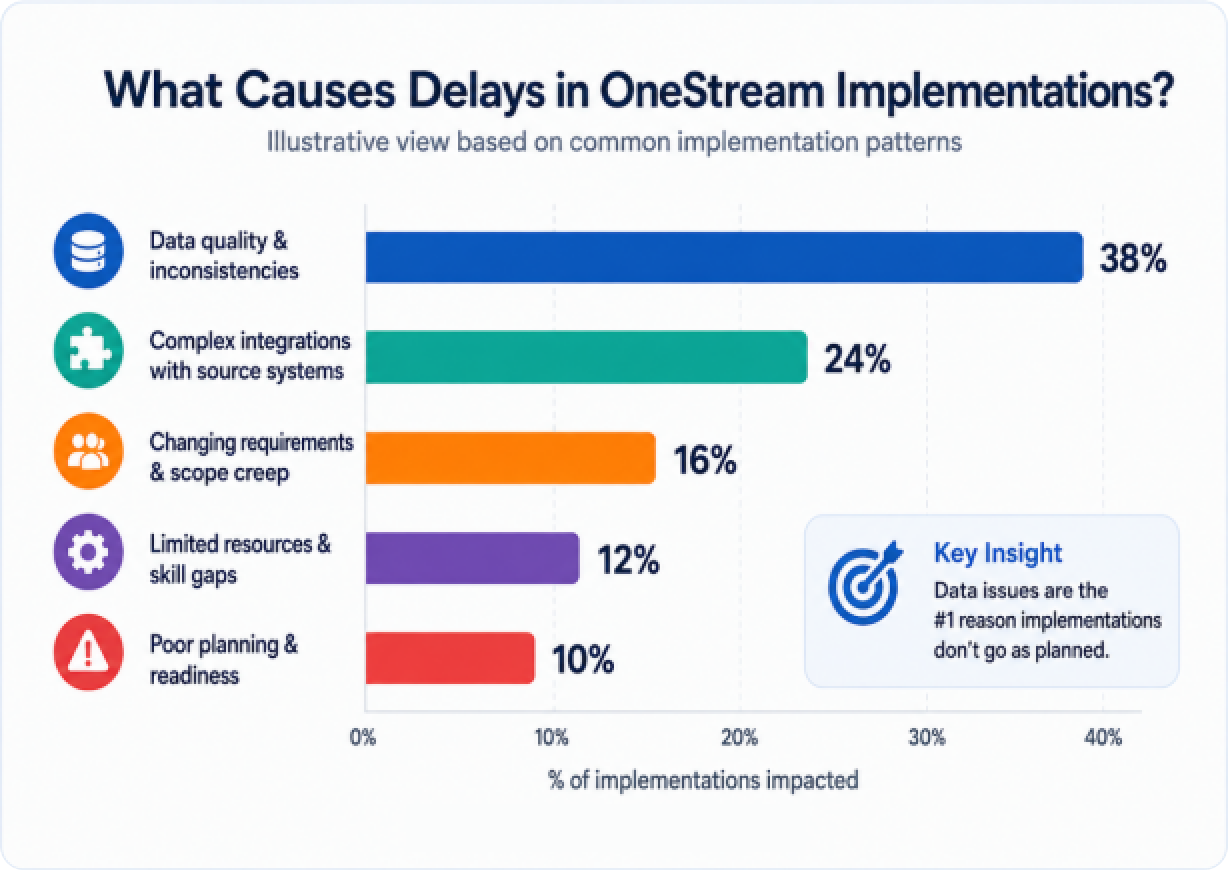
In our experience, that is rarely true. The CFO may be excited. The FP&A team may be nervous. The IT team may feel this was dropped on them. And the Controllers may have no idea what is coming.
Getting these groups aligned before Phase 1 saves an enormous amount of time later.
What to do in Phase 0:
- Document the specific pain points OneStream is solving (slow close, manual consolidation, Excel dependency, limited reporting)
- Define what success looks like in measurable terms: days to close, headcount reduction, number of manual journal entries eliminated
- Identify a steering committee with at least one executive sponsor who can unblock decisions
- Run a pre-implementation readiness assessment to identify gaps in data, IT infrastructure, and team bandwidth
- Set realistic expectations on timeline and disruption with all stakeholders
COMMON MISTAKE:
Skipping the readiness assessment
Teams that skip the readiness assessment spend 3x more time in Phase 1. A 2-week assessment upfront typically saves 6-8 weeks downstream.
PHASE 1: Data Audit and Chart of Accounts Cleanup
The unglamorous phase that determines your entire implementation quality.
If there is one phase that separates successful implementations from troubled ones, it is this one.
OneStream is exceptionally powerful at consolidating and analyzing data. But it can only work with what you give it.
If your chart of accounts has evolved organically over 15 years, if your intercompany eliminations are done in spreadsheets, or if different entities use different account codes for the same thing, you need to deal with that now.
This is not exciting work. But it is the foundation everything else sits on.
What to do in Phase 1:
- Audit your existing chart of accounts across all entities
- Identify and resolve inconsistencies in account naming, coding, and structure
- Map intercompany transaction rules and elimination logic
- Document all existing data sources: ERP systems, sub-ledgers, spreadsheets, external feeds
- Confirm data quality standards and decide what level of historical data to migrate
- Assign a data steward from the finance team who owns data quality going forward
TIMELINE REALITY:
Phase 1 takes longer than you think
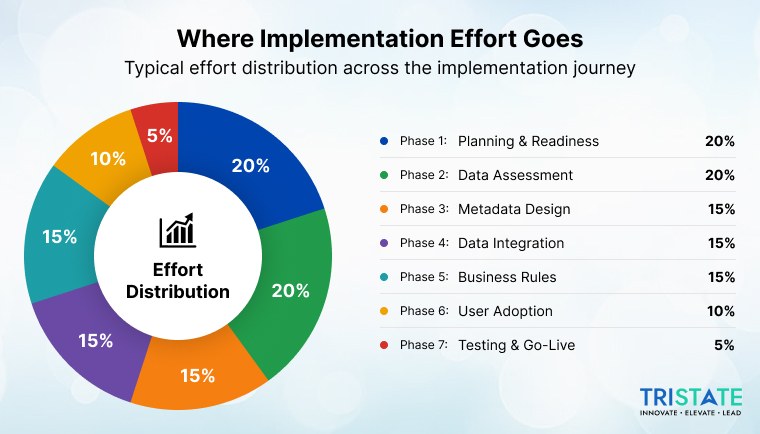
Based on our implementations, Phase 1 (data audit and cleanup) takes 20-30% of total project time for companies with complex multi-entity structures.
Budget at least 4 weeks for this phase if you have more than 5 legal entities.
PHASE 2: Platform Setup and Metadata Design
Building the structural backbone of your OneStream environment.
With your data cleaned and mapped, it is time to build the environment. This is where your OneStream implementation partner earns their fee.
Metadata design is the architecture of your OneStream application. It defines how data is organized, how consolidations work, how currencies are handled, and how the reporting hierarchy aligns with how your business actually operates.
Poor metadata design creates technical debt that is painful and expensive to undo later. Getting this right in Phase 2 means every phase after it moves faster.
What to do in Phase 2:
- Design the dimension structure: Entity, Account, Flow, Scenario, Time, and any custom dimensions
- Build and validate the consolidation hierarchy with finance leadership
- Configure currency translation rules and rates
- Set up your OneStream environment (development, test, production)
- Define security roles and access controls aligned with your organizational structure
- Document metadata design decisions for future reference and auditing
BEST PRACTICE:
Let business logic drive metadata design, not the other way around
The biggest design mistake we see is building the OneStream structure to match how data comes out of the ERP rather than how finance leadership needs to see it.
Start with the reporting output and design backwards.
PHASE 3: Data Integration and ETL Configuration
Making OneStream the single source of truth for financial data.
OneStream needs to receive data reliably from multiple source systems: your ERP, HR systems, CRM, and any other tools that feed into financial reporting. Phase 3 is where you build those pipelines.
OneStream has its own integration framework built in, but the configuration depends heavily on what source systems you are working with and the data volume involved.
What to do in Phase 3:
- Map every data source to the corresponding OneStream dimension and account
- Build and test ETL workflows for each source system
- Configure automated data loads and set up scheduling
- Define and test data validation rules to catch errors at the point of entry
- Document the integration architecture for IT and audit purposes
- Run parallel loads with test data before connecting production systems
WATCH OUT:
Real-time vs. batch loading trade-offs
Not every data source needs to feed OneStream in real time. Trying to configure real-time feeds for everything adds complexity and cost without proportional benefit.
Work with your finance team to define which data truly needs to be live versus refreshed nightly or weekly.
PHASE 4: Calculation Logic and Business Rules
Programming the intelligence into your financial platform.
This is the phase where OneStream starts looking like your business. You are translating decades of financial logic from spreadsheet formulas and tribal knowledge into a governed, auditable system.
OneStream uses its own calculation engine (Business Rules) to handle everything from intercompany eliminations to currency adjustments to custom KPI calculations.
Getting this right requires close collaboration between your finance team and the implementation team.
What to do in Phase 4:
- Document all existing consolidation and elimination rules
- Build and test intercompany elimination logic
- Configure journal entry workflows and approval routing
- Set up account transformation rules for any accounts that feed differently across entities
- Build the KPIs, ratios, and management metrics your reporting requires
- Validate all calculations against historical actuals from your legacy system
KEY INSIGHT:
Document everything, even the obvious stuff
Business rules that “everyone knows” are the ones that cause the biggest problems when a key team member leaves or when you need to audit a number 18 months later.
Use the implementation as an opportunity to build a calculation library that lives in OneStream, not in someone’s head.
PHASE 5: User Training and Change Management
The phase that determines whether the platform actually gets used.
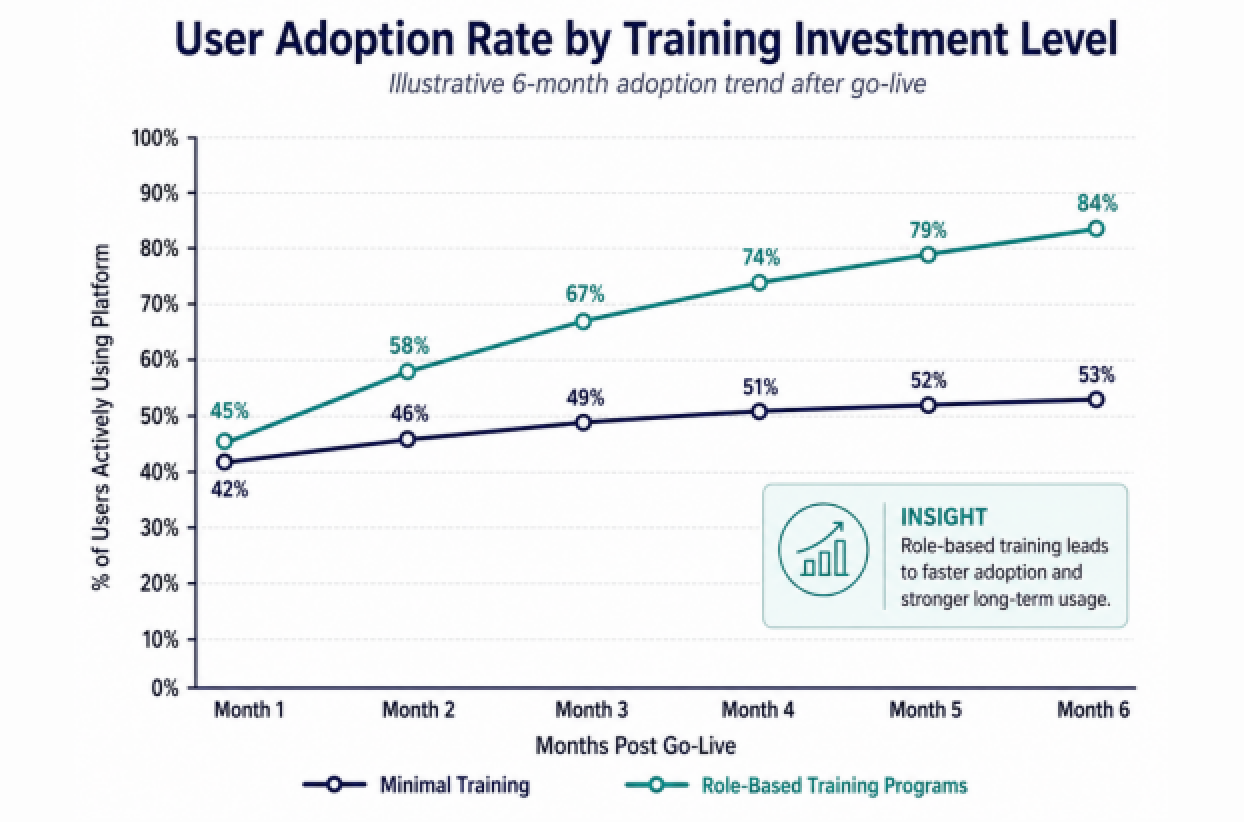
A beautifully configured OneStream environment that your finance team does not know how to use is a very expensive spreadsheet.
Change management is consistently underinvested in EPM implementations. Teams spend months on the technical build and then two weeks on training. The result is user resistance, workarounds, and slow adoption that erodes the ROI of the entire project.
The best implementations we have been part of treated user training as a Phase 0 conversation, not a Phase 5 afterthought.
What to do in Phase 5:
- Segment your users: power users, report consumers, data entry users, approvers
- Build role-specific training programs, not one-size-fits-all sessions
- Create process documentation for every workflow in the platform
- Identify and invest in 3-4 internal champions who will support colleagues post-go-live
- Run hands-on training in the test environment using real data scenarios
- Build a feedback loop: give users a clear channel to raise issues before and after go-live
PHASE 6: Parallel Run and Go-Live
The most stressful two weeks of the project. Plan for it.
A parallel run means running your old system and OneStream simultaneously for at least one close cycle. The goal is to validate that OneStream produces the same results as your legacy process before you cut over completely.
This phase is stressful by design. You are essentially doing two closes at once. But it is far less stressful than discovering a discrepancy after you have already decommissioned your old system.
What to do in Phase 6:
- Define a clear parallel run checklist with sign-off criteria for go-live
- Run at least one full close cycle (ideally two) in parallel
- Investigate and resolve every variance between legacy and OneStream outputs
- Get written sign-off from the CFO or Finance Director before going live
- Prepare a go-live day plan with clear rollback procedures if something breaks
- Communicate the go-live date and impact clearly to all affected teams
NON-NEGOTIABLE:
Do not skip the parallel run to save time
We have seen teams skip or shorten the parallel run to hit a quarter-end deadline. In almost every case, they regretted it.
If you are behind schedule, extend the timeline. Do not compress the parallel run.
PHASE 7: Optimization and Ongoing Support
Go-live is not the finish line. It is the starting line.
Most finance teams underestimate how much they will learn in the first 3 months of live use. Reports that seemed complete during UAT will need adjustments. Workflows that worked perfectly in training will create friction in production.
Phase 7 is not a cleanup phase. It is a continuous improvement phase. The organizations that get the most from OneStream treat it as a living platform that evolves as the business evolves.
What to do in Phase 7:
- Schedule a 30-day and 90-day post-go-live review with the implementation team
- Track adoption metrics and identify users who need additional support
- Build a roadmap for Phase 2 features: dashboards, forecasting models, scenario planning
- Document lessons learned from the implementation for future projects
- Establish an internal governance process for managing changes to the platform
- Plan for OneStream platform updates and how they will be tested and deployed
LONG-TERM WINS:
Where the real ROI shows up
The first year of OneStream is about stability. The second year is where the real gains come from: faster forecasting, scenario modeling, and integrated financial reporting that used to take weeks.
Teams that invest in Phase 7 consistently see 40-50% improvement in close time by Year 2.
Common Pitfalls at Each Phase
| Phase | Common Mistake | How to Avoid It |
| Phase 0 | No executive sponsor. Decisions stall. | Assign a named sponsor with budget authority before kick-off. |
| Phase 1 | Underestimating data cleanup time. | Run a data quality audit in Phase 0 to scope Phase 1 accurately. |
| Phase 2 | Building metadata to match ERP structure. | Design metadata around reporting needs, not source system structure. |
| Phase 3 | Over-engineering real-time integrations. | Batch loads cover 80% of needs. Use real-time only where it matters. |
| Phase 4 | Undocumented business rules. | Build a calculation library in OneStream with comments and version history. |
| Phase 5 | Generic training that does not match roles. | Segment users and build role-specific training with real scenarios. |
| Phase 6 | Skipping parallel run to save time. | Never skip it. Extend timeline instead. |
| Phase 7 | Treating go-live as the end of the project. | Plan a 90-day post-live review and a Phase 2 roadmap from Day 1. |
Your Pre-Implementation Checklist
Use this before you sign any implementation contract:
| ✓ Business case documented with measurable goals | ✓ Executive sponsor named and committed |
| ✓ All entities and data sources inventoried | ✓ Chart of accounts audit completed |
| ✓ Integration requirements mapped to source systems | ✓ IT infrastructure assessed and ready |
| ✓ Implementation partner evaluated and selected | ✓ Project team and RACI defined |
| ✓ Training plan agreed upon by all stakeholders | ✓ Go-live criteria and rollback plan documented |
Whether you’re migrating from legacy systems or deploying OneStream for the first time, our implementation specialists ensure a seamless, scalable, and successful rollout.