

Here’s a scene that plays out on a lot of OneStream projects. Someone on the finance team says, “Can we also handle account reconciliations in here?” The consultant nods and starts scoping a custom build. Weeks get added. The budget creeps up. And nobody stops to ask the obvious question: is there already an app for that?
Very often, there is. OneStream’s Marketplace has a big library of pre-built solutions that snap into the platform. Some install in a couple of hours. Others take a week or two. Almost all of them are faster and cheaper than building the same thing from scratch.
But here’s the catch. Not every Marketplace app is a quick win, and knowing which ones genuinely save you time is the difference between a smooth OneStream implementation and a project that drags.
This guide breaks it down in plain English: what the Marketplace is, which OneStream Marketplace solutions actually cut your implementation time, and how to decide what to install versus what to build.
Table of Contents
What is the OneStream Marketplace?
Think of the Marketplace (also called the Solution Exchange) as an app store built into OneStream. It holds 70+ pre-configured solutions that extend the platform without custom development. You download an app, drop it into your OneStream environment, point it at data you already have, and it works.
The big idea is “build once, deploy many.” Because these apps sit on the same unified platform and use the same data, you are not stitching together separate tools. Everything runs where your consolidation, planning, and reporting already live.
That is also why OneStream can claim implementation times up to 40% faster than legacy suites. You are not rebuilding common finance functions line by line. You are turning them on.
The three buckets of Marketplace apps
Not all solutions are created equal when it comes to setup time. It helps to sort them into three buckets.
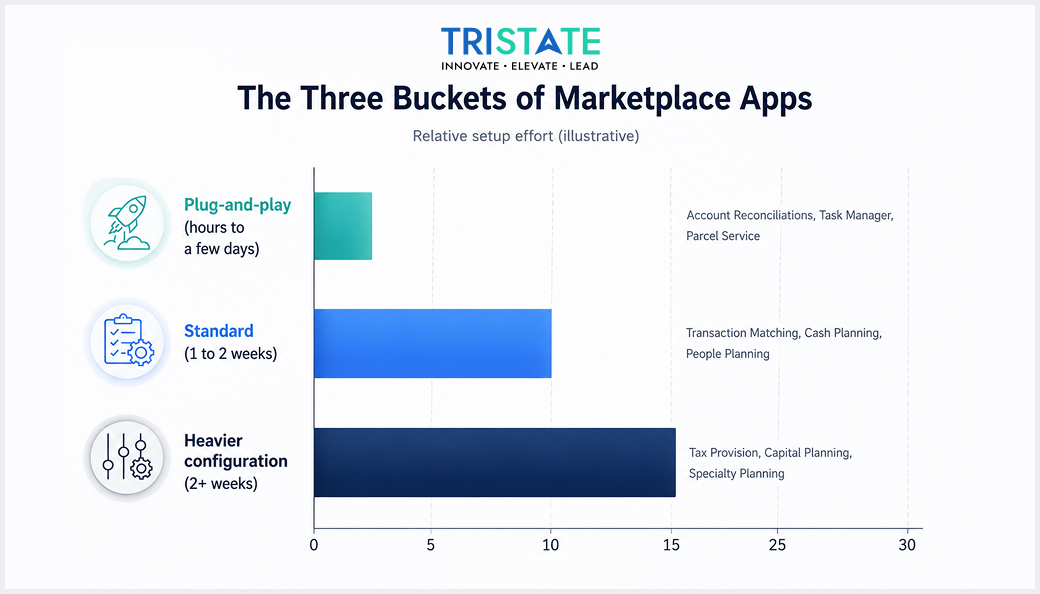
Bucket 1: Plug-and-play (hours to a few days)
These are the fast wins. They use data that already sits in OneStream and need little configuration. Great for showing value early in a project.
Bucket 2: Standard (about 1 to 2 weeks)
These need some mapping, rules, or workflow setup, but you are still nowhere near a custom build. Most planning apps land here.
Bucket 3: Heavier configuration (2+ weeks)
Still pre-built, but with more moving parts, more data, and more decisions. These save the most versus custom development, even though they take longer than the quick wins.
The point is not that bucket 3 is “slow.” It is that a heavier MarketPlace app is still dramatically faster than coding the same capability yourself. You are choosing between two weeks and two months, not two weeks and two hours.
OneStream Marketplace Apps That Cut Implementation Time
Here are the solutions that give finance teams the most obvious time savings, and when each one is worth it.
1. Account Reconciliations
This is the classic quick win, and it is a free download. It plugs straight into your close workflow and uses data already in the consolidation app, so there is very little to build. If you are running reconciliations in spreadsheets today, this is often the first app teams turn on.
2. Transaction Matching
The natural partner to reconciliations. It automatically matches high volumes of transactions (think bank lines against the ledger) so your team only looks at the exceptions. It takes a bit more setup than reconciliations, but it removes a huge amount of manual grunt work.
3. Task Manager
A close-checklist and workflow app. It tracks who owns what, what is done, and what is late across the close. Light to set up, and it brings order to a messy close almost immediately.
4. People Planning
Workforce and salary planning that pulls actuals from OneStream instead of a separate HR spreadsheet. For any team that plans headcount and compensation, this replaces one of the most painful models in FP&A.
5. Tax Provision
Automates the tax provision, effective tax rate, footnotes, and management reporting, and it exports cleanly to your tax compliance systems. This one usually needs more configuration, but it retires a spreadsheet nightmare that tax teams dread every quarter.
6. Cash Planning and Capital Planning
Purpose-built models for cash flow and capital expenditure. Instead of building these from a blank canvas, you start from a working template and adjust it to your business.
Rule of thumb: if a capability is a common finance function, check the Marketplace before you scope a custom build. Nine times out of ten, an app already exists.
Build vs. Buy: A Simple Way to Decide
You will still hit moments where the question is “install the app or build our own?”
Here is a quick way to think about it.
| Lean toward a Marketplace app when… | Lean toward a custom build when… |
| It is a common finance function (close, recs, tax, planning) | Your process is genuinely unique to your business |
| You want value in days or a couple of weeks | You have already checked and no app fits |
| You want OneStream to maintain and update it | You need something the platform simply does not offer |
| Your team is small on technical resources | You have the time, budget, and reason to justify it |
Most of the time, the app wins. The cases where a custom build makes sense are real, but they are the exception, not the rule.
A Few things to Watch Out for
Marketplace apps are fast, but they are not magic. Keep these in mind so your “quick win” stays quick.
1. Your data still has to be ready
An app that reads OneStream data assumes that data is clean and mapped. If your foundation is messy, even a plug-and-play app will stall.
2. Check version compatibility
Solutions are tied to platform versions. Make sure the app matches the OneStream version you are running before you commit.
3. Do not install everything at once
Pick the one or two apps that solve real pain now. Prove the value, then expand. A pile of half-configured apps helps no one.
4. Some free does not mean zero effort
A free download still needs setup, testing, and user training. Budget a little time even for the quick wins.
At TriState Technology, we help finance teams pick the right OneStream Marketplace solutions, configure them properly, and train the people who use them, so you get value fast without over-building.

The Bottom Line
The OneStream Marketplace is one of the biggest reasons teams get value from the platform quickly. With 70+ pre-built solutions, you can add reconciliations, transaction matching, tax provision, workforce planning, and more without paying for a custom build each time. Used well, it can cut your overall implementation time by up to 40%.
The trick is being deliberate. Start with the quick wins that use data you already have, match apps to real pain, and keep your data clean underneath. Do that, and the MarketPlace turns a long, custom-coded project into a series of fast, confident steps.
Frequently Asked Questions
-
How many solutions are in the OneStream Marketplace?
There are 70+ pre-built solutions in the OneStream Marketplace (Solution Exchange), spanning financial close, planning and analysis, and productivity tools.
-
Do Marketplace solutions really speed up implementation?
Yes. Because they are pre-built and reusable across instances, they can cut overall implementation time by up to 40% versus legacy suites and remove the need for custom development of common finance functions.
-
How long does it take to deploy a Marketplace app?
It depends on the solution. Simple apps can go live in a few hours to a few days, while heavier ones take two weeks or more. Your data readiness is often the deciding factor.
-
Which OneStream Marketplace app should we start with?
Many teams start with Account Reconciliations (a free download that uses existing data) or Task Manager, because they deliver value quickly with minimal setup.
-
Are OneStream Marketplace solutions free?
Some, like Account Reconciliations, are free downloads. Others are licensed. Even free apps still need configuration, testing, and user training.


