

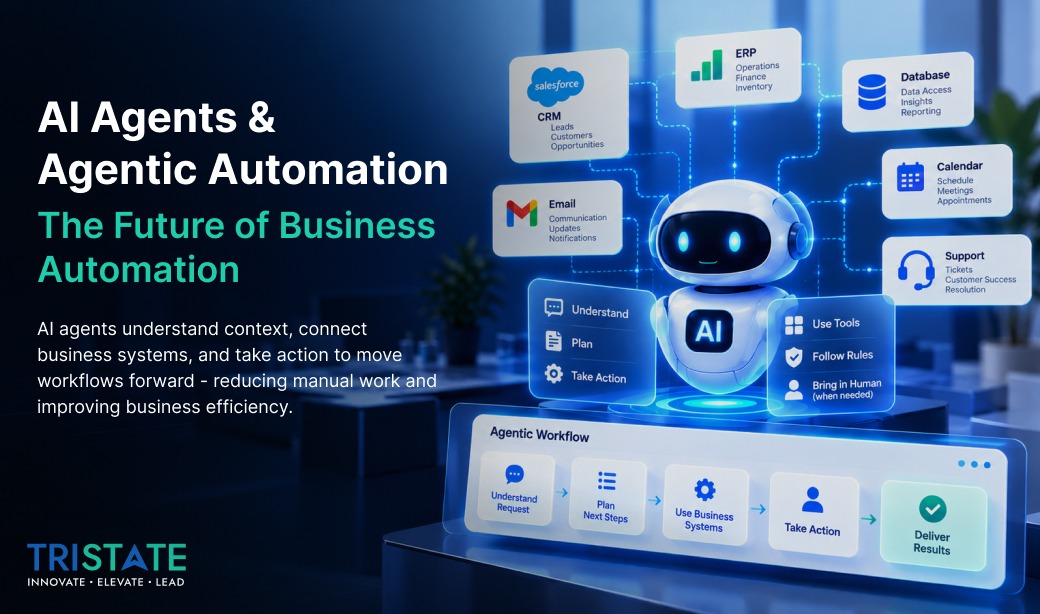
A practical look at how AI agents can reduce manual work, connect business systems, and move workflows forward.
Most businesses already use some form of automation. A lead fills out a form and gets added to the CRM. An invoice comes in and gets routed to finance. A support request is assigned to the right team. These workflows work well when the process is predictable. The challenge starts when the next step depends on context, unstructured information, or a decision that does not fit a fixed rule.
That is where AI agents and agentic automation are becoming useful. Instead of following one fixed path, an AI agent can understand what is being asked, access approved information, decide which tools it needs, take a series of actions, and bring a person into the process when human judgment is required.
The practical question for businesses is no longer only whether AI can answer questions. It is whether AI can help complete useful work safely, within clear permissions and business rules.
Table of Contents
Key Takeaways
- AI agents can combine an AI model with approved tools, business data, APIs, and workflow rules.
- Agentic automation is most useful where the next step depends on language, context, or flexible reasoning.
- Predictable processes can remain deterministic while AI handles the parts that require interpretation.
- Human approval, limited permissions, monitoring, and audit trails are important for sensitive workflows.
- A focused workflow pilot is usually a more practical starting point than trying to automate an entire department.
What Are AI Agents and How Do They Work?
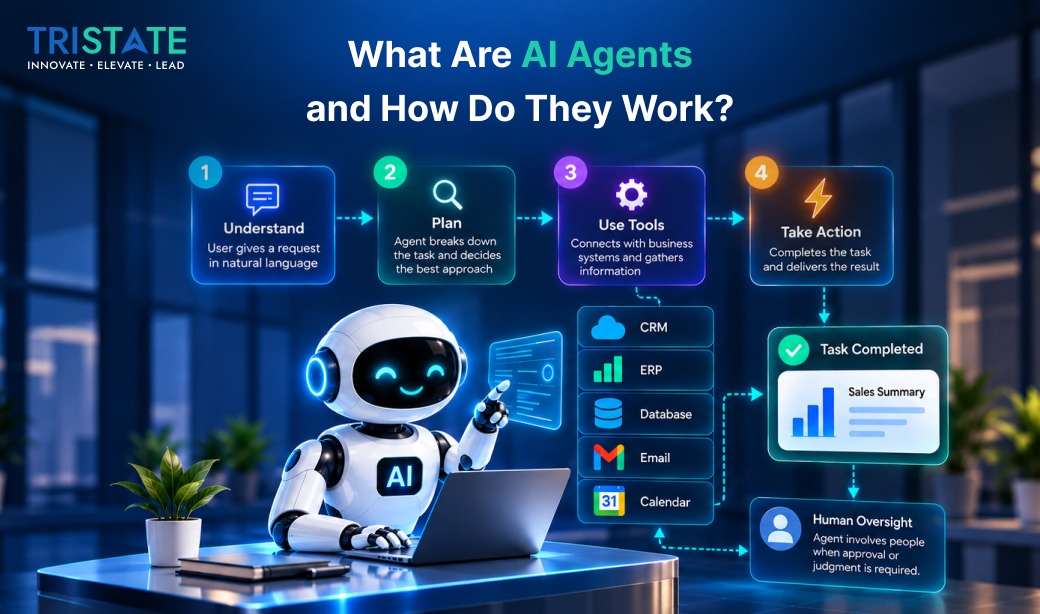
The easiest way to understand an AI agent is to compare it with a normal chatbot. A chatbot may answer, ‘Your appointment is scheduled for 4 PM.’ An AI agent can go further because it is designed not only to respond, but also to act.
Suppose a customer says, ‘I need to see a doctor tomorrow evening, preferably after 7, and I want someone who accepts my insurance.’ A basic chatbot may provide a link to the booking page. An AI agent could potentially check available doctors, filter the options, look at appointment slots, confirm eligibility, suggest suitable choices, book the selected appointment, and send a confirmation.
The value is not only in generating a response. The value is in taking useful action. An AI agent may connect with a CRM, database, ERP, calendar, ticketing platform, email account, internal application, or a set of APIs. It should not have unlimited access; it only needs the tools required to do its job. This tool-connected approach is consistent with how AI agents are described by IBM. Learn more about AI agents.
Behind the scenes, an enterprise AI agent usually combines an AI model with a controlled set of tools. One tool may search for a customer. Another may check inventory. Others may create a support ticket, update a CRM record, read approved business data, or send a message. An orchestration layer manages the steps, state, retries, and business rules around those actions.
How Agentic Automation Differs from Traditional Automation
Agentic automation sounds complicated, but the idea is straightforward: use AI in workflows where the next step is not always known in advance.
Traditional automation is excellent when the logic is clear. If an invoice is received, save it to a folder and notify finance. If a report must be sent every Friday at 5 PM, schedule it. There is no reason to introduce an AI agent where a simple rule does the job reliably.
Now imagine an invoice arrives, but the supplier name is written differently, the amount is higher than the purchase order, and the tax information looks incomplete. A person would normally review the document, compare it with the order, check the supplier record, and decide whether the invoice should be approved, rejected, or sent for clarification.
An agentic workflow can help with those steps. It may read the invoice, pull the supplier record, compare the amount, identify the mismatch, and decide that the invoice needs human review. It is not replacing every decision; it is reducing the manual effort required to reach that decision.
That is why effective AI workflow automation usually combines approaches. Predictable steps remain deterministic. AI is used where language, context, or flexible reasoning is needed. Sensitive actions stay behind clear approval rules.
Where Businesses Can Use AI Agents Today
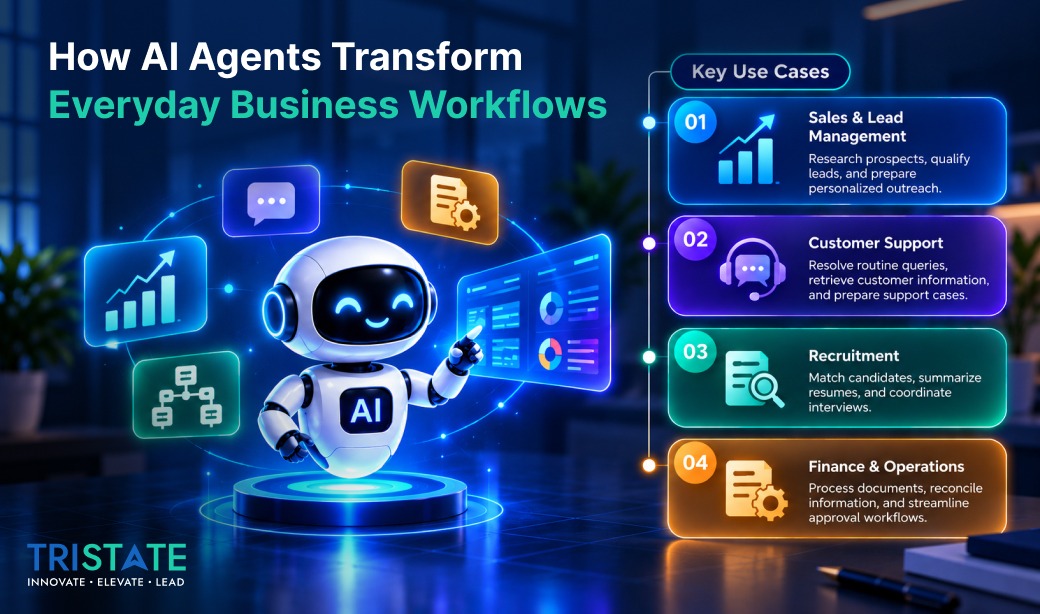
The appeal of AI agents is practical. Many companies are not struggling because they lack software. Their teams lose time because work is spread across too many systems, screens, documents, and small decisions.
1. Sales and Lead Management
A salesperson may look up a company, check its website and LinkedIn presence, search the CRM, write an email, log the activity, and set a reminder. An AI sales agent can reduce that research and administrative work. For example, someone could ask, ‘Find growing software companies in California that may need an external product development team.’ The agent could research companies, organize the information, identify relevant engineering or growth signals, and prepare a shortlist. It could then draft personalized outreach for review. The salesperson still decides whom to contact and what to send, but the starting point is much faster.
2. Customer Support
Customer support is another strong use case. Many chatbots work well until the customer asks something that does not fit the FAQ. Then the conversation often ends with, ‘Please contact support.’
An AI support agent can potentially check the customer’s order, review previous tickets, search the knowledge base, and create the right case automatically. If the issue is simple, it may resolve it. If the request involves a refund, account change, or another sensitive action, it can prepare the information and ask a person to approve the next step.
3. Recruitment
Recruitment is filled with repetitive steps that still require context. Recruiters review profiles, compare experience against job requirements, arrange interviews, prepare summaries, and update systems. An AI recruitment agent can help with resume screening, candidate matching, scheduling, interview summaries, and structured scorecards while leaving the final hiring decision with people.
4. Finance, Operations, and Document Processing
Finance and operations teams often move between email, spreadsheets, accounting software, ERP platforms, and approval workflows. This creates a natural opportunity for agentic automation. A finance user might ask, ‘Show me customers with invoices overdue by more than 45 days and tell me who manages each account.’ The system may need data from both finance and CRM.
An AI agent can retrieve and combine that information, prepare follow-up actions, and wait for approval before anything sensitive is sent or changed. Document-heavy work is another useful area. Purchase orders, contracts, applications, and invoices arrive in different formats every day. An agent can extract relevant information, understand the context, validate it against another system, and route the task to the right next step.
5. Multi-Agent Systems
Some larger workflows can be divided between specialized agents. A sales process might use a research agent, qualification agent, outreach agent, and CRM agent. Each receives a focused responsibility and set of permissions. This can improve control in complex systems, but not every process needs several agents. If one well-designed agent can do the work reliably, adding more agents may simply create unnecessary complexity.
For organizations evaluating broader AI development services, these use cases can be mapped to existing applications, data sources, APIs, and approval workflows.
For customer-facing workflows that depend heavily on language understanding, Natural Language Processing services can complement AI-agent architectures.
Also Read: How AI Agents Improve Customer Experience.
Why Integration and Human Oversight Matter
One of the most important parts of an AI agent project is not the language model. It is integration. An agent becomes useful when it can work with the systems a company already depends on, such as Salesforce, HubSpot, Microsoft Dynamics, SAP, ServiceNow, OneStream, internal databases, custom applications, and industry-specific platforms.
If someone asks, ‘Which customers are most likely to renew this quarter?’ the AI model does not know the answer on its own. It needs controlled access to the right customer, usage, contract, or financial data. Authentication, permissions, APIs, logging, workflow design, and error handling matter just as much as the model.
Human oversight matters for the same reason. There is a tendency to talk about AI agents as if complete autonomy is always the goal. For most businesses, it is not. Some tasks can be automated end to end, while others should stop at a review point.
An agent may summarize a medical conversation, but a clinician should make the diagnosis. It may prepare a payment, but an authorized finance employee should approve the transfer. This human-in-the-loop approach lets companies reduce repetitive work without giving up accountability.
Security becomes a much bigger concern when an AI agent is allowed to do more than just answer questions. The safest approach is to give the agent only the access it genuinely needs and nothing more. Access levels, audit trails, approvals, privacy controls, monitoring, and error handling should be decided while the system is being designed, rather than added later.
For a recognized framework for managing AI risks and trustworthiness considerations, see the NIST AI Risk Management Framework.
How to Start with AI Agents in Your Business
The best starting point is usually not a large AI transformation program. It is one well-defined workflow that happens often, takes time, involves multiple systems, and has a clear outcome.
- Good candidates include lead qualification, support ticket handling, appointment booking, invoice processing, document review, internal reporting, and employee information requests.
- Map the current process before choosing technology. Which steps are repetitive? Which require understanding? Which decisions involve risk? Which actions can safely be automated?
- Start with a focused pilot and define the outcome, permissions, human approval points, monitoring requirements, and success measures.
The goal is not to add more AI for the sake of it. The goal is to remove friction. If a sales team spends hours researching prospects, reduce that time. If support teams repeatedly search the same systems, automate the lookup. If finance staff manually compare documents every day, help them review those documents faster.
That is the real promise of AI agents and agentic automation. The shift is not simply from manual work to automation. It is from rigid workflows to systems that can understand context and help move work forward safely.
Businesses do not necessarily need another chatbot. They need AI that understands what needs to happen next, connects with the right systems, and takes action within clear boundaries.
At TriState Technology, we help businesses design and build AI agents, agentic workflows, and AI-powered applications that integrate with existing software, data, and business processes. Our focus is practical: create AI systems that reduce manual effort, improve workflow efficiency, and help teams get more work done. Explore TriState’s AI Development Services.
Frequently Asked Questions
-
What is an AI agent?
An AI agent is a software system that can understand a request, use approved tools or business systems, and take steps to complete a task. Unlike a basic chatbot, an AI agent can retrieve information, update records, trigger workflows, or prepare actions for human approval.
-
What is agentic automation?
Agentic automation uses AI in workflows where the next step may depend on context. Instead of following only fixed rules, the system can understand a situation, choose an appropriate action, and continue the process within defined business limits.
-
How are AI agents different from chatbots?
Chatbots are mainly designed for conversation. AI agents can also take action. A chatbot may tell a customer which appointment slots are available, while an AI agent may check availability, book the appointment, update the system, and send a confirmation.
-
What are common AI agent use cases for businesses?
Common use cases include sales research, customer support, appointment booking, recruitment, invoice processing, document review, internal reporting, finance workflows, and employee support.
-
Do AI agents replace employees?
In many business workflows, a practical use is to reduce repetitive work rather than remove human decision-making. Employees can stay focused on decisions, relationships, and higher-value work while the agent handles routine research, data movement, or workflow steps.
-
Can AI agents work with existing business software?
Yes. AI agents can connect with CRM, ERP, finance, support, healthcare, and other business systems through APIs or controlled integrations. The quality and security of those integrations are often as important as the AI model itself.
-
Are AI agents safe for enterprise use?
They can be designed with clear controls. Businesses should use role-based access, audit logs, limited permissions, secure authentication, monitoring, and human approvals. An agent should only be allowed to access the systems and actions required for its job.
-
What is a multi-agent system?
A multi-agent system uses several specialized AI agents that work together. One agent may research information, another may qualify it, and another may update the CRM. This can help with complex workflows, although it is not necessary for every use case.
-
How should a business start with agentic automation?
Start with one repetitive workflow that has a clear business outcome. Map the current process, identify which steps are predictable, which require judgment, and which need human approval. A focused pilot is usually more practical than trying to automate an entire department at once.


